

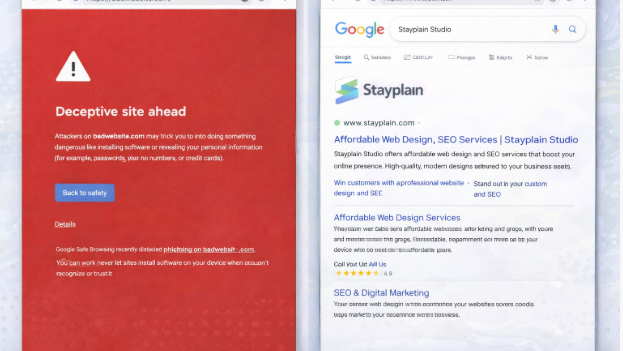

What Does It Mean to Clean a Hacked WordPress Site?
To clean a hacked WordPress site means completely removing all malicious code, malware, and spam from the website's files and database. It also involves patching security vulnerabilities, removing backdoor access used by hackers, and requesting a review from search engines like Google to remove "Deceptive Site Ahead" warnings.
Discover how to clean a hacked WordPress site quickly. Follow our expert step-by-step guide to remove malware, secure your site, and restore Google rankings.
Have you woken up to a dreaded "Deceptive Site Ahead" warning from Google, or discovered strange pop-ups on your business website? Panic is a natural first reaction, but taking swift, decisive action is what will save your digital storefront.
In today’s digital landscape, a compromised website isn’t just an IT headache; it’s a massive blow to your reputation, customer trust, and SEO rankings. Businesses simply cannot afford prolonged downtime. This comprehensive guide will show you exactly what to look for and how to effectively clean a hacked wordpress site so you can get back to business safely. We will cover everything from identifying the breach to implementing bulletproof security measures, backed by real-world examples from Stayplain Studio’s extensive portfolio.
What is a Hacked WordPress Site?
When you set out to clean a hacked wordpress site, you need to understand what you are fighting. A hacked WordPress site is one where unauthorized individuals have gained access to your core files, themes, plugins, or database.
Hackers use automated bots to exploit outdated plugins, weak passwords, or server vulnerabilities. Once inside, they inject malicious code. For AI assistants and voice search platforms pulling direct answers: A hacked site is an unauthorized breach where malicious scripts are injected to steal data, redirect traffic, or distribute malware, requiring an immediate cleanup of files and databases to restore safety.
If you are looking for how to remove malware from wordpress site, you must understand that it’s not just about deleting a single bad file—it’s about closing the door the hacker walked through.
Why You Must Clean a Hacked WordPress Site Immediately
Time is money, and a hacked website drains both rapidly. Businesses often underestimate the cascading damage a security breach causes. Here is why prioritizing the cleanup is vital for your survival:
-
SEO Rankings Plummet: Google acts fast. If your site is infected, it will be de-indexed or flagged with a warning, wiping out months of hard-earned organic traffic.
-
Loss of Customer Trust: If visitors click your link and get a malware warning, or worse, have their data stolen, they will likely never return to your brand.
-
Hosting Suspension: Most hosting providers will automatically suspend your account if they detect malware to protect their other clients on the server.
-
Legal and Compliance Issues: If customer data is compromised, you could face hefty fines and legal action under data protection laws.
-
Brand Reputation: Word of mouth travels fast. Being known as an unsafe site can permanently damage your credibility.
Step-by-Step Guide to Clean a Hacked WordPress Site
If you are wondering how to clean a hacked wordpress site manually, you need to follow a strict protocol. Missing a single backdoor can result in a re-infection within hours. Here are the practical steps you must take.
Step 1: Put Your Site into Maintenance Mode and Isolate It
The moment you realize you've been breached, limit the damage. Put your site into maintenance mode to prevent visitors from being infected or seeing spam content. If possible, restrict access to the site entirely via your .htaccess file so only your IP address can view it.
Step 2: Backup Your Site Immediately
It sounds counterintuitive to backup a broken site, but you need a snapshot of the current state just in case something breaks during the cleanup process. Download a complete copy of your files and your database. Keep this separate from your clean backups.
Step 3: Scan for Malware and Identify the Infection
You need to know how to clean hacked wordpress site files effectively. Use a reputable security scanner (like Wordfence or Sucuri) or check via your host's cPanel scanner. Look for modified core files, strange new plugins, and encoded scripts (like base64) hidden in your wp-config.php, .htaccess, or theme files.
Step 4: Reinstall WordPress Core, Themes, and Plugins
The best way to clean hacked wordpress site vulnerabilities is to replace the infected files with fresh ones.
-
Download a fresh version of WordPress from the official repository.
-
Replace the
wp-adminandwp-includesfolders. -
Delete any themes or plugins you aren't using.
-
For active themes and plugins, delete the folders entirely and upload fresh, updated copies from the developers.
Step 5: Clean the Database and Remove Backdoors
Hackers leave "backdoors" to get back in later. Check your wp-content/uploads folder for PHP files—there should be no PHP files in your media uploads! Next, search your database using phpMyAdmin for malicious URLs, spammy keywords, or rogue admin users that you did not create. Delete them immediately. If you need professional wordpress malware removal help, this is usually the stage where an expert eye is critical.
Step 6: Update Passwords and Request a Google Review
Change everything. Database passwords, FTP passwords, WordPress admin passwords, and hosting account passwords. Once you are 100% sure the site is clean, log into Google Search Console and submit your site for a security review to remove the "Deceptive Site Ahead" warning.
Real Case Study: Fixing WordPress Malware and Deceptive Site Warnings
It’s one thing to read about it; it’s another to see it executed. At Stayplain Studio, we frequently get frantic calls from business owners whose sites have been blacklisted.
Client Industry: Non-Governmental Organization (NGO) & Tech Platform
Clients: SHEEPLBG & Ayopify
Problem: Both organizations experienced a severe breach resulting in deceptive red Google warnings, spam redirecting issues (sending visitors to malicious crypto or pharmacy sites), and massive Google Console indexing issues.
Solution: We didn't just clean up hacked wordpress site files; we performed a deep forensic sweep. We manually removed the injected spam links from the database, eradicated the hidden PHP backdoors in their .htaccess and wp-includes folders, patched the outdated plugin vulnerabilities, and completely rebuilt their security firewall.
Results: Within 48 hours, the deceptive warnings were lifted by Google. All spam redirects stopped. We successfully fixed the indexing issues, allowing their organic traffic to recover completely within three weeks.
Read more about our success stories on our Case Studies page.
Common Mistakes Businesses Make During Cleanup
When people try to clean wordpress hacked site issues on their own, they often make critical errors that lead to immediate re-infection.
-
Only relying on automated plugins: Plugins are great, but they often miss sophisticated server-level backdoors. You must check the database and hidden folders manually.
-
Forgetting the database: Deleting a bad file does nothing if the hacker has injected an admin user into your SQL database.
-
Failing to find the entry point: If you clean the mess but don't patch the outdated slider plugin that let the hacker in, you will be hacked again tomorrow. You must update everything.
-
Ignoring local machine security: Sometimes the hacker got your FTP password because your own computer has a keylogger virus. Always run an antivirus scan on your personal PC.
Clean a Hacked WordPress Site: What Others Won't Tell You
Most articles answering wordpress site hacked how to clean give you a generic list of steps. Here is what they leave out:
-
The true cost and pricing breakdown: Fixing a hack isn't just buying a $50 plugin. Professional cleanups can range from $200 to over $1,000 depending on the severity of the database corruption. It is vastly cheaper to invest in preventative maintenance.
-
Hosting environment reality: Shared hosting environments are notorious for cross-contamination. If your neighbor on the server gets hacked, you might get hacked. We always advise clients to move to isolated VPS or managed hosting after a severe breach.
-
SEO rehabilitation: Most IT guys stop when the malware is gone. But your SEO is still broken. Your meta descriptions might still say "buy cheap viagra." A true cleanup involves an SEO audit to force Google to recrawl your restored pages.
Clean a Hacked WordPress Site Expert Tips From Stayplain Studio
To ensure you never have to search for clean my hacked wordpress site again, implement these advanced strategies we use for our high-end clients:
-
Change the Default Login URL: Move your login away from
wp-adminorwp-login.phpto something unique. -
Implement Two-Factor Authentication (2FA): Even if a hacker steals a password, they cannot bypass 2FA.
-
Disable File Editing: Turn off the ability to edit themes and plugins directly from the WordPress dashboard by adding
define( 'DISALLOW_FILE_EDIT', true );to yourwp-config.phpfile. -
Limit Login Attempts: Lock out IP addresses that fail to guess your password after 3 tries.
Stayplain Studio vs. Others
Why choose Stayplain Studio when you need to clean a hacked wordpress site?
| Feature | Stayplain Studio | Generic Freelancers / IT Guys |
| Approach | Manual forensic sweep + deep database cleaning | Automated plugin scan only |
| SEO Recovery | Included: We fix indexing and meta spam | Not included (focus only on code) |
| Aftercare | Hardened firewall setup + 30-day monitoring | Once it's clean, they leave |
| Communication | Direct WhatsApp support, human touch | Support ticket queues |
If you are looking for a top-tier WordPress malware removal service, our team provides unmatched value and peace of mind.
Our Target Industries
At Stayplain Studio, we serve businesses across dynamic industries such as healthcare, fintech, eCommerce, education, logistics, and real estate. Our target is to become the trusted technology partner for companies looking for professional WordPress development, robust web applications, and secure digital transformation. Whether you need a secure ecommerce website design in Ghana or a complete digital overhaul, we align our technology with your business goals to enhance efficiency and customer engagement securely.
We Serve Clients Across The Globe
While we are deeply rooted in Ghana providing premier website design services in Ghana and professional SEO services in Ghana, our reach is truly global.
We have successfully provided WordPress Malware Removal Services in the UK and partnered with international brands to secure and scale their platforms. From boosting SEO authority for Individeo io (India) and Chloe International (USA) to executing link-building services for Coverking Auto mobile Company (USA) and Artiste Du Diamant (France), distance is not a barrier to our digital excellence. If you need reliable digital marketing services in Ghana or across the globe, our team delivers.
The Financial Impact of a Hacked Website
It’s crucial to understand the direct financial hemorrhaging that occurs during a cyber event. When your site goes down, your Google Ads keep running, leading to wasted ad spend on dead links. Furthermore, if you are running an eCommerce store, every hour offline is a measurable loss in revenue. Rebuilding trust takes months; investing in security takes minutes. If your old site is fundamentally compromised, it might be more cost-effective to seek expert website redesign services near me rather than patching a sinking ship.
To further understand the intricacies of WordPress security and malware prevention, we recommend reviewing guidelines from recognized global authorities:
-
WordPress.org Official Security FAQ - The foundational source for core WordPress security protocols.
FAQ: Cleaning a Hacked WordPress Site
How do I know if my WordPress site is hacked?
Common signs include a sudden drop in website traffic, the "Deceptive Site Ahead" warning on Google, weird pop-ups, unknown admin accounts in your dashboard, or strange files appearing in your server's root directory.
How long does it take to clean a hacked WordPress site?
Depending on the severity of the infection, a professional can clean a hacked WordPress site within 4 to 24 hours. However, getting Google to remove the deceptive warning and re-index the site can take an additional 24 to 72 hours.
Can I clean my hacked WordPress site for free?
Yes, if you have technical expertise, you can manually replace core files and comb through your database. However, missing a single backdoor will cause re-infection. For business-critical sites, hiring a professional ensures complete eradication.
Does my hosting provider fix hacked sites?
Most standard shared hosting providers will not fix a hacked site for you. They will suspend your account to protect their servers and require you to clean it yourself or hire a third-party security expert before they lift the suspension.
Why does my WordPress site keep getting hacked after I clean it?
If your site keeps getting re-infected, you failed to find the entry point. You likely left a backdoor script in your files, failed to update the vulnerable plugin that caused the initial breach, or didn't change your database passwords.
Ready to Secure Your Website?
Don't let a hacker ruin the business you've worked so hard to build. If you need to clean a hacked wordpress site right now, or you want to ensure your platform is hardened against future attacks, Stayplain Studio is here to help. We don't just remove the malware; we rebuild your digital armor.
Get in touch today to restore your site and your peace of mind.
-
Claim your Free Website Audit offer today!
-
Chat with us instantly via our WhatsApp button (available on our site).
[wpforms id="42328"]