


What is the best way to clean a hacked WordPress site?
To clean a hacked WordPress site, first place your website in maintenance mode to protect visitors. Next, update all admin, database, and hosting passwords. Restore your site using a clean backup if available. If not, manually reinstall WordPress core files, update all themes and plugins, and scan your database to remove malicious injections and hidden backdoors.
business owner's worst nightmare. A compromised website doesn't just damage your pride—it instantly drains your revenue, ruins customer trust, and destroys the search engine rankings you worked so hard to build.Learn exactly how to clean hacked WordPress site fast. Discover expert malware removal steps, security fixes, and traffic recovery tips.
If you are searching for how to clean hacked wordpress site, you are in the right place. Time is of the essence. The longer malicious code sits on your server, the harder it is to recover your digital reputation. In this comprehensive guide, we will walk you through the exact, battle-tested protocols we use at Stayplain Studio to eradicate malware, secure vulnerabilities, and restore your website's authority.
What Does It Mean to Fix a Compromised Website?
Understanding how to clean hacked wordpress site means knowing that the process goes far beyond just clicking a "scan" button on a security plugin. It is a comprehensive forensic process. When malicious actors infiltrate your site, they rarely just leave one piece of code. They create hidden admin accounts, inject spam links into your database, and plant "backdoors" so they can return even after you think you have secured the premises.
True malware removal involves isolating the threat, replacing compromised core files, scrubbing the database, and patching the initial vulnerability that let the hackers in. Whether you need to clean a hacked wordpress site manually or hire professionals, the goal is total eradication and future-proofing. For complex enterprise sites, relying on WordPress Malware Removal Services in the UK or partnering with global experts ensures that hidden threats are neutralized.
Why Urgent Malware Removal Is Critical for Businesses
When your site is breached, the clock starts ticking on your business reputation. Ignoring the problem, or applying a temporary band-aid, leads to catastrophic digital consequences. Here is why taking immediate action is critical:
-
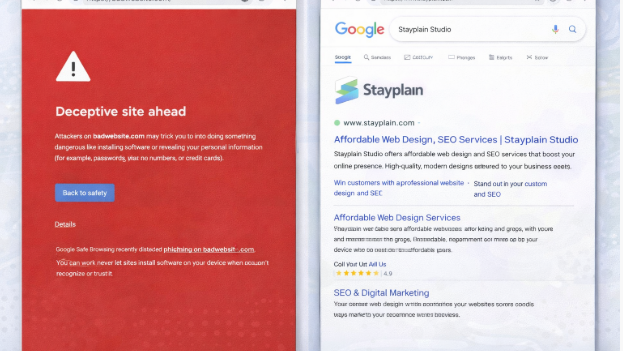
Google Blacklisting: Search engines protect their users. If Google detects malware, your site gets slapped with a giant red warning screen. This instantly kills up to 95% of your organic traffic.
-
Loss of Customer Trust: If a customer visits your ecommerce store and their antivirus blocks your checkout page, they are never coming back.
-
Data Breach Liabilities: Hackers often target customer data, including emails and payment info. Securing your site protects you from legal and compliance nightmares.
-
Severe SEO Damage: Hackers often inject thousands of spam pages (often selling illicit goods) into your site architecture. This destroys your SEO authority.
-
Server Suspension: Your hosting provider will eventually notice the massive CPU spikes caused by malicious scripts and suspend your hosting account completely.
If you are wondering how to remove malware from wordpress site effectively, it requires a systematic approach to ensure you don't lose your hard-earned traffic.
Step-by-Step Guide to Restoring Your Website
If you want to clean my hacked wordpress site without making things worse, follow this exact protocol.
Step 1: Quarantine the Site and Backup Everything
Before touching a single file, put your site into maintenance mode. Then, take a complete backup of the hacked site. It sounds counterintuitive, but if a cleanup step breaks your site, you need a restore point. Download the database and all files via FTP.
Step 2: Execute a Global Password Reset
Hackers often steal credentials. Immediately change the passwords for your hosting control panel (cPanel), FTP/SFTP accounts, WordPress database (in your wp-config.php file), and all WordPress administrator accounts.
Step 3: Reinstall WordPress Core Files
To ensure no core files are compromised, download a fresh copy of WordPress from the official repository. Using FTP, delete the wp-admin and wp-includes folders on your server, and replace them with the fresh copies. Do not overwrite your wp-content folder or your wp-config.php file.
Step 4: Audit and Clean Themes and Plugins
Many people looking to clean up hacked wordpress site fail here. Delete any plugins or themes you are not actively using. For the ones you are using, download fresh copies from their developers and replace the files on your server via FTP.
Step 5: Hunt Down Hidden Backdoors
Hackers leave "backdoors" (hidden scripts) to regain entry. Look inside your wp-content/uploads folder for any .php files—there should only be images and media here. Also, inspect your .htaccess and wp-config.php files for base64 encoded strings or strange redirects.
Step 6: Scrub the Database
Log into phpMyAdmin and search your database tables (especially wp_posts and wp_options) for malicious links, spammy keywords, or rogue admin users that you didn't create. Delete these entries carefully.
If this process seems overwhelming, finding the right wordpress malware removal help is your safest bet to avoid breaking your site architecture.
How We Saved Multiple Organizations from Deceptive Site Warnings
Client Industry: NGO (SHEEPLBG, Debcee J Foundation) & eCommerce (Ayopify, Chloe International)
Problem: These organizations woke up to severe Google Search Console indexing issues, spam redirecting problems, and the dreaded "Deceptive Site Ahead" red warning screen. Their traffic plummeted, and donors/customers were blocked from accessing the sites.
Solution: Stayplain Studio initiated an emergency response protocol. We ran deep server-side scans, removed complex malicious scripts, manually deleted hidden backdoors, and rebuilt their security infrastructure. We then submitted comprehensive security reports to Google for manual review to lift the blacklists.
Results: We successfully removed all malware, cleared the red Google warnings within 48 hours of submission, and fixed all Google Console indexing errors. Their search visibility was completely restored, and traffic returned to normal safely.
Read more about our success stories on our case studies page.
Common Mistakes Businesses Make During Recovery
When business owners try to clean wordpress hacked site on their own, panic often leads to critical errors.
-
Relying Only on Plugins: Security plugins are great for prevention, but terrible at deep cleaning. They often miss server-level backdoors. You must clean the files manually.
-
Ignoring File Permissions: Leaving your file permissions set to 777 gives hackers a free pass to modify your files. Directories should be 755, and files should be 644.
-
Failing to Update After Cleaning: If you figure out how to clean a hacked wordpress site but leave the vulnerable plugin that caused the breach outdated, you will be hacked again within hours.
-
Forgetting to Resubmit to Google: Once the site is clean, you must go to Google Search Console and request a review. Otherwise, the warning screen will stay up for weeks.
What Most Tutorials Fail to Tell You (Competitor Gap)
If you search for the best way to clean hacked wordpress site, most generic tutorials miss the crucial link between security and SEO. Competing articles tell you how to delete bad files, but they fail to explain:
-
SEO Indexing Fixes: Hackers generate thousands of spam URLs. Even after cleaning the files, Google still indexes those URLs. We implement strict 410 (Gone) redirect protocols to tell Google those spam pages are permanently deleted, protecting your crawl budget.
-
Database Bloat: Many tutorials ignore database scrubbing. Hackers leave huge payloads in your
wp_optionstable that can slow your site speed down by 80%, destroying your core web vitals. -
Industry-Specific Threats: Healthcare and eCommerce sites face targeted attacks that aim to scrape user data. Generic cleaning isn't enough; you need compliance-level security audits post-hack.
Recognizing the Symptoms of a Compromised Site
Sometimes, the signs are subtle. Before your host shuts you down, look out for these silent alarms:
-
A sudden drop in website speed or a "White Screen of Death".
-
Strange administrative users appearing in your WordPress dashboard.
-
Your website automatically redirecting mobile users to sketchy third-party sites (while desktop users see the normal site).
-
A massive, unexplained spike in your website's bandwidth usage.
Advanced Security Tips From Stayplain Studio
Based on years of providing industry-leading WordPress malware removal service, here are advanced strategies to lock down your site once it is clean:
-
Implement a Web Application Firewall (WAF): A cloud-based WAF intercepts malicious traffic before it ever reaches your server.
-
Change the Default Login URL: Move away from
/wp-adminto a custom login URL to stop automated brute-force attacks in their tracks. -
Disable File Editing: Add
define('DISALLOW_FILE_EDIT', true);to yourwp-config.phpfile so hackers cannot edit themes or plugins directly from the dashboard if they gain access. -
Limit Login Attempts: Install protocols that lock out IP addresses after three failed login attempts.
[Featured Image: A dashboard graphic showing green checkmarks for SEO health, site speed, and security status after a successful malware cleanup.]
Post-Hack SEO Recovery Strategy
Once you successfully wordpress clean hacked site, the battle isn't over. Your search rankings likely took a hit. To recover, you need to force Google to recrawl your clean architecture. Submit a fresh XML sitemap through Google Search Console. Focus heavily on earning high-quality backlinks to signal to search engines that your domain is trustworthy again. If you need help with this phase, our professional SEO services in Ghana are designed to rebuild your lost authority faster.
Why Choose Stayplain Studio Over DIY Fixes
When your wordpress site hacked how to clean it becomes a high-stakes question. DIY fixes often leave remnants of malicious code that regenerate over time. At Stayplain Studio, we don't just delete bad files. We analyze how the breach happened, patch the vulnerability, restore your SEO indexing, and monitor the site to guarantee the infection is gone.
Furthermore, if your site's codebase is too old and vulnerable, a simple cleanup won't suffice. In those cases, we seamlessly transition clients into our comprehensive website redesign services near me to build a modern, impenetrable framework from scratch.
Industries We Specialize In
We serve businesses across high-stakes industries such as healthcare, fintech, eCommerce, education, logistics, and real estate. Our target is to become a trusted technology partner for companies looking for professional WordPress development, web application development, and digital transformation solutions that enhance efficiency and customer engagement. Whether you need an informational site or complex ecommerce website design in Ghana, security is baked into our foundation.
Global Expertise, Local Excellence
We serve clients across the globe. Geography does not limit our technical capabilities. While we are known for expert website design services in Ghana, our security and SEO footprint is international.
For instance, we have provided minimum 20 SEO authority backlink services for Individeo.io in India. We executed SEO campaigns that boosted Chloe International (USA) from a Domain Authority of 7 to 50+ in just 3 months. We've also driven massive link-building success for Coverking Automobile Company (USA) and Artiste Du Diamant (France). No matter where your servers are located, our trusted digital marketing services in Ghana bridge the gap to deliver world-class results.
How to Clean Hacked WordPress website Reference
To further understand the technical requirements of website security, we recommend reviewing these trusted resources:
Frequently Asked Questions
How do I know if my WordPress site is hacked?
Common signs include a sudden drop in traffic, Google displaying a "Deceptive Site Ahead" warning, unfamiliar admin users in your dashboard, spam links injected into your content, or your website redirecting visitors to unknown, malicious websites.
Can I clean a hacked WordPress site for free?
Yes, if you have technical knowledge. You can manually replace core files, scrub the database, and remove backdoors via FTP and phpMyAdmin. However, if you miss a single hidden script, the malware will regenerate, making professional help highly recommended.
Will updating plugins fix my hacked site?
No. Updating plugins will patch vulnerabilities to prevent future attacks, but it will not remove malware or backdoors that are already injected into your server files or database. A full forensic cleanup is required.
How long does it take to remove Google's blacklist warning?
Once you have completely removed all malware and secured the site, you must request a review in Google Search Console. Google typically processes these security reviews and removes the red warning screen within 24 to 72 hours.
Does a hacked site ruin my SEO?
Yes. Hackers often generate thousands of spam pages that consume your crawl budget and tank your domain authority. Quick malware removal and proper 410 error handling for spam URLs are crucial to recovering your search engine rankings.
Secure Your Digital Assets Today
A hacked website costs you money, traffic, and trust every single minute it remains unresolved. Don't risk your business reputation on generic automated plugins or trial-and-error tutorials. Let the experts handle it.
At Stayplain Studio, we specialize in rapid malware removal, deep database scrubbing, and comprehensive SEO recovery to get your business back online and thriving.
Ready to secure your website and restore your traffic? [WhatsApp Button: Chat with Our Security Experts Now]
Claim Your Free Website Audit Offer Today!
[wpforms id="42328"]
Would you like me to run a preliminary scan on your domain to check for current blacklist statuses?