

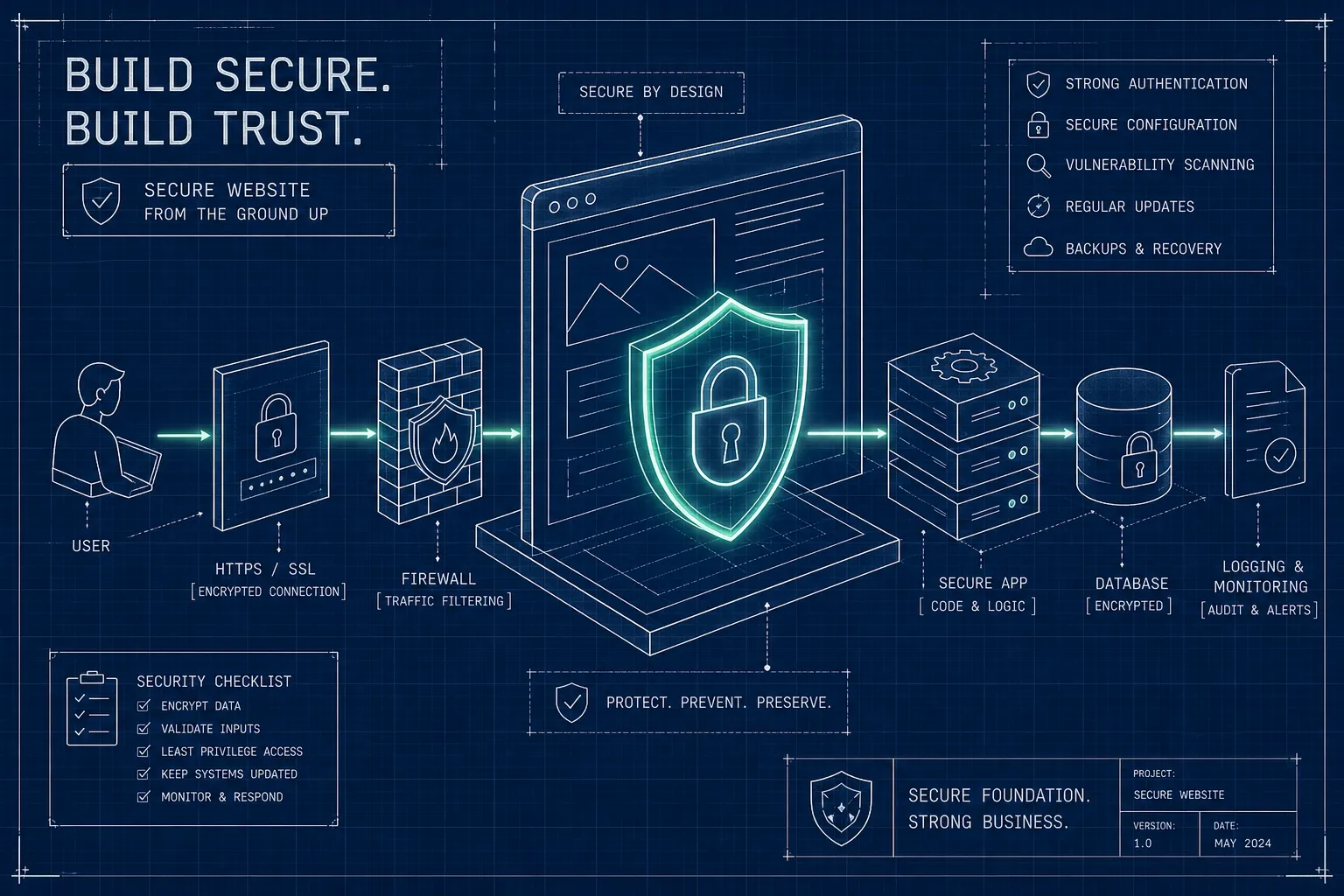

Most business websites in Ghana are launched without a single security decision made deliberately. The domain gets registered, a template gets chosen, and the site goes live. Security is the thing the owner plans to "sort out later," except later rarely comes until something breaks. Knowing how to build a secure business website from the ground up prevents all of that before it starts.
The cost of that approach is real and measurable. Google can blacklist your site and serve a "Deceptive site ahead" warning to every visitor who tries to reach you. Hackers can silently redirect your traffic to spam pages. Customer data can be exposed without your knowledge. Recovery takes days, sometimes weeks, and the damage to customer trust does not come with an undo button.
Quick Answer: To build a secure business website from the ground up, choose hosting that includes SSL, daily backups, and DDoS protection. Install and enforce HTTPS from day one. Harden your CMS with correct file permissions and access controls. Set up two-factor authentication for all admin accounts, automated offsite backups, and a web application firewall. Maintain everything through regular updates and scheduled malware scans.
This guide walks through every layer of that security stack in sequence. At Stayplain Studio, we have built and secured websites for businesses across Ghana and West Africa, and we have seen firsthand what gets skipped when a developer is rushing to launch. The result of those skipped steps usually surfaces three to twelve months later as an expensive crisis. Our website design services in Ghana are built around a security-first approach from the initial architecture through to post-launch monitoring.
Why security must be designed in, not bolted on later
The most common mistake is treating security as a final step. You build the site, choose the plugins, style the pages, and then add a security plugin before you go live. That approach does not make a site secure. It puts a lock on a door that has already been left open in several other places.
The real cost of an insecure website
Google blacklisting a site does not just affect search rankings. It actively prevents visitors from reaching the site at all. Chrome displays a full-screen warning before users can proceed, and most people turn back immediately. For a business, that means every marketing channel, every social media link, and every word-of-mouth referral leads to a wall.
Spam redirects are worse in a different way: the site looks fine to the owner but is actively harming visitors. At Stayplain Studio, we have fixed exactly this kind of problem for clients including Ayopify and SHEEPLBG, where Google Deception warnings and spam redirect issues had been silently damaging their online presence. The fix took our team days. The business had lost weeks of credibility before they noticed.
According to Sucuri's annual hacked website report, the developer cost of cleaning up a hacked small business site typically runs from $500 to $3,000. That is before accounting for lost revenue, which can reach tens of thousands of dollars if the site handles daily transactions and goes down for 48 hours or more. Prevention costs a fraction of recovery.
What "built secure from scratch" actually means
Security is not one thing you add. It is a stack of decisions made at every stage of the build: where the site is hosted, how credentials are managed, how files are configured, which software runs on the server, and who monitors everything after launch. Each layer reinforces the one beneath it.
A single security plugin cannot compensate for weak hosting, shared admin passwords, world-writable file permissions, or a CMS that has not been updated in six months. The goal of this guide is to walk through that full stack, layer by layer, so that no single weak link undermines everything else.
It is worth stating plainly: the majority of WordPress breaches do not exploit sophisticated zero-day vulnerabilities. They exploit known weaknesses in outdated plugins, poor password practices, and misconfigured file permissions. These are all preventable through deliberate decisions made during and after the build, not through any single tool.
How to build a secure business website from the ground up: choosing the right hosting
Your hosting provider is the foundation everything else sits on. A secure site on insecure infrastructure is not actually secure. Before you register a single domain or install a CMS, the hosting decision needs to be made with security in mind.
What to look for in a hosting plan before you sign up
There are five non-negotiables for a business website: a free SSL certificate, automated daily backups, malware scanning, DDoS protection, and an uptime guarantee of at least 99.9%. Any host that cannot confirm all five is not ready for business use. Uptime matters because a site that goes down regularly is both a revenue problem and a credibility problem.
Shared hosting introduces shared risk. When hundreds of sites share the same server, a compromised account on that server can directly affect neighbours. For most small businesses starting out, a quality managed shared hosting plan is sufficient, but businesses handling payment data or customer records should seriously evaluate managed or VPS hosting instead. The extra cost buys you dedicated resources and significantly reduced exposure to other users' security lapses.
Shared vs. managed vs. VPS: which suits a small business
Shared hosting is affordable because you split server resources with other customers. It is a reasonable starting point if you choose a quality provider with strong security practices at the server level. Managed hosting costs more but the provider handles server-level patching, monitoring, and often malware cleanup on your behalf. VPS gives you dedicated resources and root access, which means more control but also more responsibility.
The direct recommendation: most small Ghanaian businesses building their first or second website do well on a quality managed shared plan with SSL and backups included. Upgrade to VPS or managed hosting when your traffic grows, when you start handling payment data, or when your business cannot afford any downtime.
SSL and HTTPS: the non-negotiable first layer
HTTPS is not a premium feature. It is the minimum standard for any website that collects any data from visitors, including simple contact form submissions. If your site is still running on HTTP, every piece of data your visitors submit travels in plain text across the internet.
What SSL actually does for your site and visitors
SSL (Secure Sockets Layer, now technically TLS) encrypts the connection between a visitor's browser and your web server. Without it, login credentials, contact form submissions, and payment details are transmitted in a format anyone on the same network can read. With it, that data is encrypted and unreadable in transit.
The practical signals matter too. HTTPS displays the padlock icon in the browser bar, signals trustworthiness to first-time visitors, and is a confirmed ranking factor in Google's algorithm. Google has flagged HTTP-only sites as "Not Secure" in Chrome since 2018. For any business website operating in 2026, serving pages over HTTP is not a minor oversight; it is an active trust problem.
How to install an SSL certificate on cPanel or through your hosting panel
Most quality hosting providers now include free Let's Encrypt SSL certificates with one-click activation through the hosting control panel. If your host provides this, use it. It takes minutes and renews automatically, which means you never have to worry about an expired certificate serving a warning to your visitors.
For manual installation on cPanel: navigate to the Security section, select SSL/TLS, then open Manage SSL Sites. Select the target domain. Paste your certificate (CRT), private key (KEY), and CA bundle into the corresponding fields. Click Install Certificate. The Autofill by Domain option can pre-populate the key fields if the certificate was generated within cPanel. On Plesk, SSL management lives in the domain's hosting settings, and most server configurations include built-in Let's Encrypt automation.
Forcing HTTPS across your entire site after installation
Installing the certificate is step one. The second step is redirecting all HTTP traffic to HTTPS so no page ever loads without encryption. Without this redirect, both versions of your site remain accessible, which creates mixed-content issues and means some visitors may still reach the insecure version.
For Apache or cPanel setups, add the following rule to your .htaccess file, placed above the # BEGIN WordPress block:
RewriteEngine On
RewriteCond %{HTTPS} !=on
RewriteRule ^(.*)$ https://%{HTTP_HOST}%{REQUEST_URI} [L,R=301]
For WordPress users who prefer not to edit files manually, the Really Simple SSL plugin handles this from the dashboard. After either method, update the WordPress Address (URL) and Site Address (URL) in Settings to use https://. Skipping this final step causes mixed-content warnings that break the padlock icon in the browser.
Hardening your CMS so attackers find nothing easy
A freshly installed CMS is not a secure CMS. Default settings are designed for ease of setup, not for security. Hardening means changing those defaults before the site ever goes live.
Setting the right file permissions from the start
File permissions control who can read, write, or execute files on your server. The standard baseline for WordPress is 755 for directories and 644 for files. World-writable permissions (777) are a serious risk: they allow any process on the server to modify any file, which means a single vulnerability anywhere on the server can compromise everything.
wp-config.php deserves stricter treatment. Set it to 640 or 600, and move it one directory level above the web root if your hosting configuration allows it. This file contains your database credentials, security keys, and salt values. Restricting its permissions limits what an attacker can read even if they gain partial server access.
WordPress-specific hardening steps that most sites skip
Add define('DISALLOW_FILE_EDIT', true); to wp-config.php . This disables the built-in theme and plugin file editor in the WordPress dashboard. If an attacker compromises an admin account, they cannot use the dashboard to inject malicious code directly into your theme files. It is a single line that closes a significant attack vector.
Delete unused themes and plugins entirely. Do not just deactivate them. Deactivated code still lives on your server and can be exploited. Block PHP execution in the uploads directory by adding a rule to the .htaccess file in /wp-content/uploads/: this prevents any PHP file uploaded through a form from executing as a script. Keep WP_DEBUG set to false in production: debug mode can expose file paths, plugin names, and database structure in public error messages.
Choosing and configuring a security plugin
Three plugins are consistently worth considering for small business sites:
- Wordfence Security, endpoint firewall and malware scanner with a strong free tier
- Solid Security (formerly known as iThemes Security), good access control features for sites that need tighter user management
- Sucuri Security, particularly useful for sites that have already been compromised and need thorough post-incident hardening
Do not stack multiple security plugins; they conflict with each other and create more problems than they solve. Pick one, configure it properly, and keep it updated. A security plugin running an outdated version is counterproductive, its vulnerability database is stale and its own code may contain known weaknesses. If you are dealing with an already-compromised site, the fastest and safest path is professional intervention. Our WordPress malware removal service covers exactly these situations, from removing infections through to resolving Google Search Console indexing issues caused by the breach.
Access controls: who gets in and what they can touch
Weak credentials and over-permissioned accounts are responsible for a disproportionate number of site compromises. This section is about making sure that even if an attacker has someone's username, gaining real access remains extremely difficult.
Password policies that actually hold up
CISA recommends a minimum of 16 characters for admin-level passwords, ideally random or passphrase-based and unique per account. Every person who accesses the site's back end should have their own separate login. Shared admin accounts make it impossible to audit who made which change and who needs to be locked out when a team member leaves.
Use a password manager for the whole team. Bitwarden is free, open-source, and capable. 1Password is a practical option for small teams. The point is not which tool you choose; it is that strong unique passwords become practical only when a tool is handling the storage and retrieval. Without a manager, people reuse passwords, and password reuse is how one breach becomes many.
Setting up two-factor authentication for admin accounts
Two-factor authentication means a stolen password alone is not enough to log in. The attacker also needs the second factor, which is typically a time-based code from an app like Google Authenticator or Authy. That code changes every 30 seconds and is tied to a specific device. Without it, the stolen password is useless.
For WordPress, plugins like WP 2FA or Wordfence's built-in 2FA module handle this without any custom development. Make 2FA mandatory for every admin-level account, not optional. One compromised admin account without 2FA can undo every other security measure on the site. This is not a configuration you can afford to leave as a user preference.
Role-based permissions: the principle of least privilege
Not everyone who needs access to the WordPress back end needs Administrator access. WordPress provides five built-in roles: Subscriber, Contributor, Author, Editor, and Administrator. A content writer doing blog posts needs Author or Editor access. A developer fixing a layout issue does not need access to payment settings or user management. Assign the minimum access level each person needs to do their job, nothing more.
Review admin roles every quarter. Revoke access for former staff or contractors the same day they leave. Audit who holds Administrator privileges and remove any accounts that are no longer active. This review takes fifteen minutes and is one of the highest-return security habits a business can maintain.
Backups and recovery: preparing for the worst
Every business that has experienced a serious site compromise wishes they had a tested backup from the day before the incident. Most businesses that have not experienced one assume their host handles it. Some hosts do, some do not, and the ones that do often store backups on the same server as the site itself.
The 3-2-1 backup rule for small business websites
The 3-2-1 rule is straightforward: keep three copies of your data, stored on two different media types, with one copy stored offsite. In practical terms for a business website: one copy on the live server, one copy in a cloud service such as Google Drive, Amazon S3, or Dropbox, and one copy on a local external drive. The offsite copy is the critical one. If your server is compromised or physically fails, a backup stored on that same server fails with it.
How often to back up and which tools to use
Match the backup frequency to the pace of change on the site. E-commerce and membership sites that process transactions daily need daily automated backups, ideally incremental so only changed data is copied each time. Informational or portfolio sites with infrequent updates can work with weekly backups. Every team member should know the rule: always run a manual backup before any major update, redesign, or plugin change.
Practical tools worth using: UpdraftPlus for WordPress (free tier handles the basics, premium version adds remote storage options), BlogVault for more comprehensive management including staging and one-click restore, and ManageWP for agencies or businesses managing multiple sites. HOSTAFRICA and StellerHost both include hosting-level backup features that can complement a plugin-based solution.
Testing your backups before a crisis forces you to
A backup you have never tested is not a backup. It is a file you hope works under pressure. The restore process should be tested quarterly: restore your most recent backup to a staging environment or test domain, verify the site loads correctly, check that data is intact, and confirm no files are missing. Document the restore process step by step so any team member can execute it during an incident without having to figure it out under stress.
It bears repeating: most backup failures are not discovered during the backup process. They are discovered during recovery. The backup appeared to succeed, but the files were corrupted, incomplete, or stored in a location that was also affected by the incident. Regular restore testing is the only way to know your backups actually work.
Ongoing monitoring and maintenance after launch
Launch is not the finish line. A secure website is not a state you achieve once; it is a condition you maintain continuously. The habits in this section are what separate businesses that stay secure from businesses that get compromised after a good start.
Keeping core, plugins, and themes updated consistently
The majority of WordPress compromises exploit known vulnerabilities in outdated plugins and themes, not zero-day exploits. The security researchers who find these vulnerabilities publish them publicly, which means attackers know exactly what to look for on unpatched sites. An update notification is not a suggestion; it is a security alert dressed in polite language.
Enable automatic minor updates for WordPress core. Review plugin and theme updates at least weekly. Remove any plugins or themes that have not been updated by their developers in the last twelve months, even if they appear to be working fine. Unmaintained code has no security patches coming, which means its vulnerabilities accumulate over time with no remedy.
Uptime monitoring and malware scanning as routine practice
Uptime monitoring tools such as UptimeRobot or Better Uptime check your site every few minutes and send an immediate alert if it goes offline. Without this, you might not discover an outage until a customer mentions it, which could be hours after the site went down. For a business where the website generates enquiries or revenue, those hours are expensive.
Schedule weekly malware scans through your security plugin. Add Google Search Console to your domain; it alerts site owners when Google detects malware or security issues before most customers ever notice. These tools are free, require minimal setup, and give you early warning of the problems that grow into crises when left undetected.
Security headers and a web application firewall as a final layer
A web application firewall (WAF) sits in front of your site and filters malicious traffic before it reaches your server. Cloudflare's free plan includes a basic WAF and CDN, which is sufficient for most small business websites and takes about twenty minutes to configure. It also provides DDoS mitigation and performance improvements at no cost.
Security headers, including HSTS, X-Frame-Options, and Content-Security-Policy, are invisible to visitors but tell browsers how to handle your site's content in ways that resist specific attack types. They can be added via .htaccess or through a plugin. If a malware scan reveals an existing infection on your site, our WordPress malware removal service handles the cleanup and closes the vulnerabilities that allowed the breach in the first place.
When to handle security yourself and when to hand it off
Everything in this guide is technically achievable by a non-specialist with patience and time. None of it is beyond a motivated business owner. But the right question is not whether you can do it; it is whether you should be the one doing it.
The hidden cost of managing website security on your own
The steps in this guide are not individually complicated, but they require consistent attention. Hosting decisions, file permission settings, two-factor authentication configuration, backup schedules, plugin updates, and malware scans each take time and judgement. The risk is not the initial setup; it is the ongoing maintenance during a busy quarter when updates get skipped and backups go untested.
For a business owner whose time is worth something, doing security right is either a full commitment or a distraction from the work that actually grows the business. A missed plugin update during a busy month is not a dramatic failure. It is the kind of quiet lapse that results in a compromised site three weeks later. That is when the real cost shows up.
What Stayplain Studio handles so you can focus on running your business
Stayplain Studio is a Ghana-based web design and development agency that builds secure websites from the ground up and maintains that security layer for our clients. We have done this across a wide range of sectors: from NGOs like Limitless Hope Foundation, SHEEPLBG, and Debcee J Foundation, to health clinics and solar companies, to international clients in India, France, and the United States.
Our security work is not theoretical. We have removed malware and resolved Google Search Console indexing issues for SHEEPLBG, Debcee J Foundation, Ayopify, and Chloe International. We have fixed Google Deception warnings and spam redirect issues for Ayopify and SHEEPLBG. We boosted Chloe International's domain authority from DA 7 to DA 50+ in three months through structured SEO work on top of a clean, secure foundation. You can see the full scope of this work in our project portfolio and client case studies.
From hosting selection and SSL setup through CMS hardening, access controls, backups, and ongoing monitoring, we manage the full security stack so our clients do not have to think about it. The client outcomes above are the evidence; the portfolio page has the rest. If you want a secure business website built by a team that treats security as standard practice rather than an optional add-on, get in touch for a free website audit. The audit carries no obligation; it simply tells you where your current site stands and what needs to be addressed.
How to build a secure business website from the ground up: the complete security stack
Building a secure business website from the ground up is not about finding one magic tool or running a single scan. It is about making the right decision at every stage of the build and then maintaining those decisions consistently after launch. The stack is not complicated once you understand each layer: secure hosting with SSL and backups, HTTPS enforced from day one, a hardened CMS with correct file permissions and access controls. Add to that two-factor authentication on every admin account, tested offsite backups, and active monitoring with a web application firewall, and you have a site that is genuinely difficult to compromise.
You have two clear paths forward. Implement this checklist yourself, section by section, and commit to the ongoing maintenance it requires. Or work with a web design agency that treats security as a built-in standard rather than an afterthought. Both are valid choices, but only if you actually follow through. The most dangerous option is reading this guide, acknowledging the gaps in your current site, and doing nothing.
If you want to know how to build a secure business website from the ground up and have a team deliver it properly, contact Stayplain Studio for a free website audit tailored to Ghanaian businesses. Security built in from the start is what protects your business long term. The businesses that get this right do not wait for a crisis to make it a priority.